
The Avatar Workbench
The Avatar Workbench Addon creates an exact replica of the Second Life system character directly inside your scene, including the reference skeleton and the original system mesh parts.
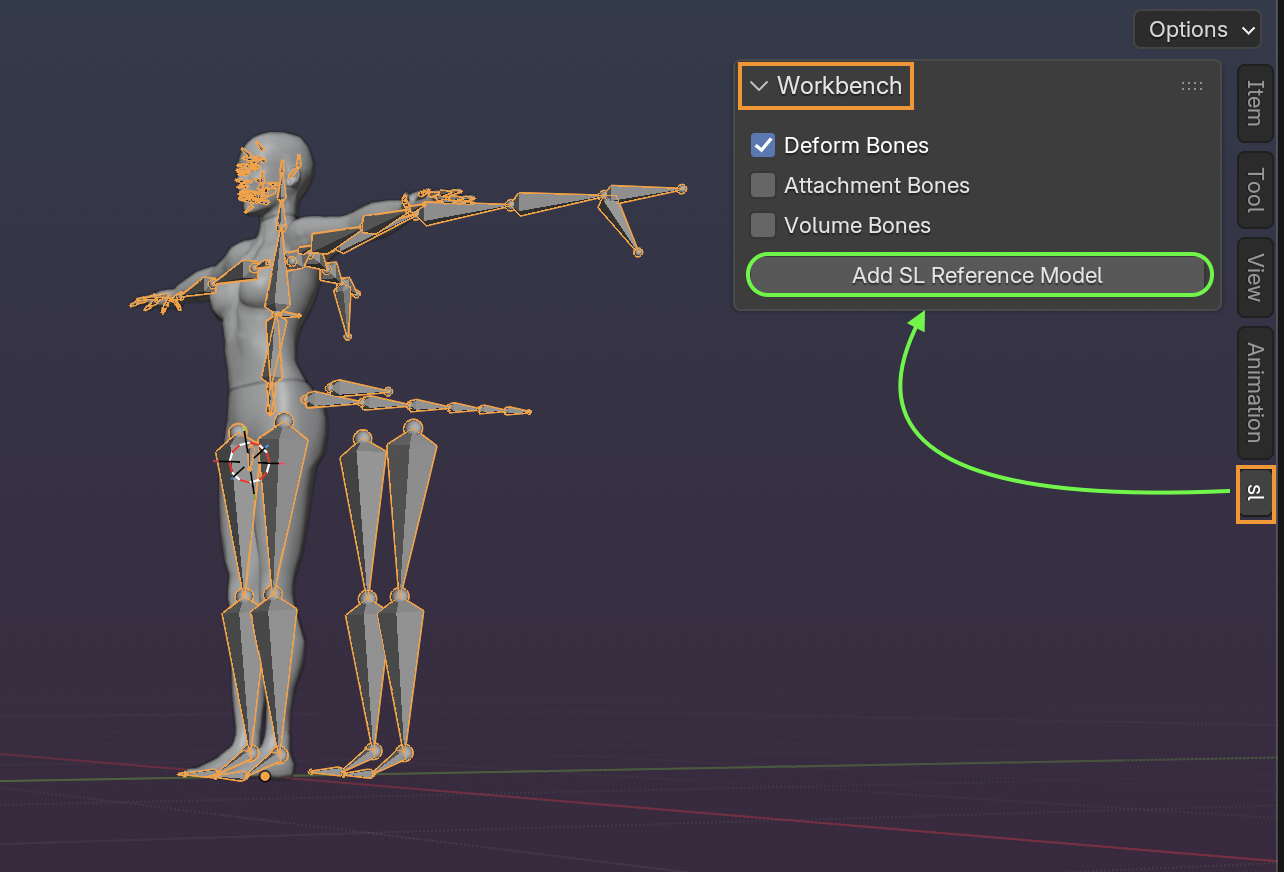
The created model includes mesh weights and deforming bones by default, with options for attachment bones and volume bones. It can be used as a starting point for your own rigged mesh projects, or as a clean reference when you need to inspect how the Second Life system avatar is put together.
Download
-
Avatar Workbench Addon 1.0Blender addon zip file
-
Download the Blender addon zip file.
-
Install it from Blender with Edit > Preferences > Add-ons > Install.
- Enable Avatar Workbench.
What it adds
After installation, open the 3D Viewport sidebar, select the SL tab, open the Workbench panel, choose which bone sets you want, and press Add SL Reference Model.
The operator creates:
-
the Second Life reference skeleton
-
the SL system meshes for head, hair, upper body, lower body, eyes, eyelashes, and skirt
-
mesh weights and vertex groups for the reference mesh
-
optional attachment point bones from the SL avatar definition
-
optional volume bones
-
UVs and vertex groups based on the bundled Second Life reference data
This gives you a copy of the Second Life reference model, not a full creator pipeline. It is meant to be inspected and used as a starting point for custom character work.
The reference model is derived from Linden Lab's Second Life avatar files and carries their CC BY 3.0 license. Usage is free, but attribution is required when your work is used outside Second Life.
How to export
Avatar Workbench does not add its own exporter. Export is only covered through Blender's official glTF exporter, using the binary .glb format.
Before exporting:
-
Select only the mesh objects and the armature you want to export.
-
Keep Export Skins enabled (
export_skins=True). -
Keep Export Deformation Bones enabled (
export_def_bones=True). -
Keep Export Leaf Bones disabled (
export_leaf_bone=False). -
Limit weights to 4 influences when targeting strict realtime pipelines.
-
Make sure the armature contains only the bones you want in the result: deform bones, plus attachment or volume bones only when you intentionally included them.
- Make sure mesh vertex groups match the exported bone names.
Where it fits
Avatar Workbench is useful when you want to inspect the raw Second Life character structure or start from a lightweight reference scene. It does not replace a complete workflow for rigging, fitting, exporting, and maintaining complex avatars.
For that broader workflow, Avastar remains the full experience. Avatar Workbench keeps the reference model simple and accessible.
Requirements
-
Blender 5.0.1 or newer; Blender 4.5 LTS may also work
-
A basic understanding of Blender armatures and mesh objects
- Second Life mesh creation knowledge if you plan to build upload-ready assets
The addon is provided as a free starting point. It is intentionally small, and the model is generated directly from the official Second Life avatar definition files, including their quirks and asymmetries.
Disclaimer
Avatar Workbench is provided as-is, without any guarantee that it is complete, suitable for a particular workflow, or accepted by a target platform. Use it at your own risk, keep backups of your work, and verify exported files in your own pipeline. We are not liable for project damage, data loss, failed uploads, or other consequences of using the addon. This free addon does not include individual project support.