
Historical Sparkles guide. Screenshots and instructions reflect older Blender versions and may differ from current releases.
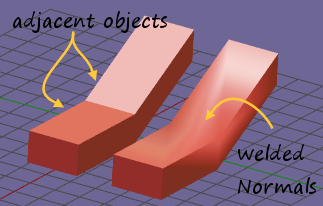
Whenever 2 objects touch each other along adjacent edges, we need to look into the mesh normals to avoid seeing seams due to the object material settings (how they reflect light depending on the relative orientation)
The weld tool helps to fix some common situations...
The Welding Panel
You find the normals tool in the Tool toolshelf, in the Sparkles panel.
In object mode the normals tool operates on all verts, while in Edit mode it operates only on selected verts
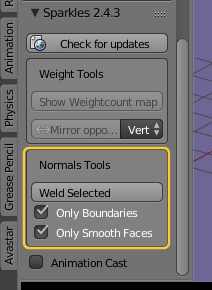
The normals tool has 2 options:
-
Only Boundaries: The tool operates only on vertices which belong to boundary edges (a boundary edge is only assigned to one single polygon)
-
Only Smooth Faces: the tool only operates on vertices which belong to faces that have been marked as smooth (in edit mode)
Important: When you disable both options then the welding operation may take a very long time to complete for meshes with many thousand vertices.